
M618 Wireless Vertical Mouse: An Ergonomic PC Mouse with a 57° Vertical Angle to Reduce Wrist Strain During Extended Use
Black
£39.98
Sale price
£39.98
Regular price
Skip to product information

 Introductory paragraph: If you spend long hours at a computer, you might be familiar with the dull ache in your wrist and forearm that comes from using a traditional mouse. The M618 wireless vertical mouse offers a different approach by positioning your hand in a more natural, handshake-like posture. This is achieved through its specific 57° vertical angle design, which aims to reduce the inward rotation (pronation) of your forearm. By aligning your hand, wrist, and forearm more neutrally, it can help alleviate the muscle strain associated with repetitive mouse movements. The mouse connects wirelessly via a 2.4GHz USB dongle for a clutter-free desk setup and operates on a low 5V power supply. With compact dimensions of 135.5mm by 100.0mm by 87.0mm and a light weight of 115g, it's designed for precise control without causing fatigue during extended use.
 Brief section introduction with specific content preview: The M618 isn't just about a different shape; its construction and specifications are geared towards reliable, comfortable daily use. We'll look at the specific design elements that create its ergonomic profile, the technical specs that govern its performance, and the material choices that contribute to its durability and feel.
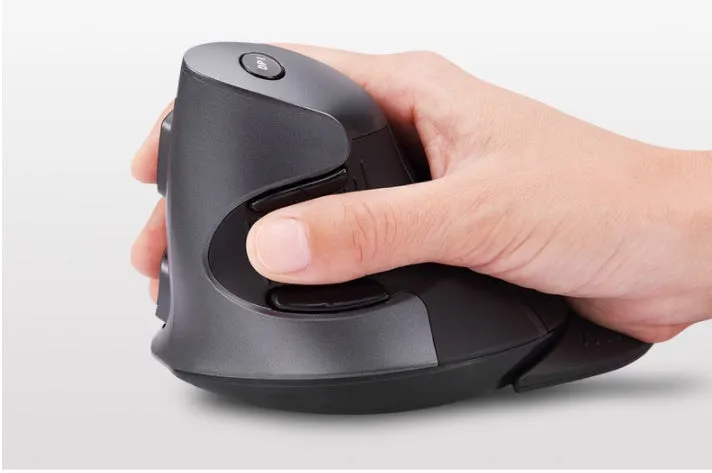 Brief section introduction with specific usage scenarios: An ergonomic mouse like the M618 finds its place in various settings where computer use is intensive. Its benefits are most apparent in professional environments with long working hours, but it also enhances everyday computing at home, offering versatility for different users and tasks.
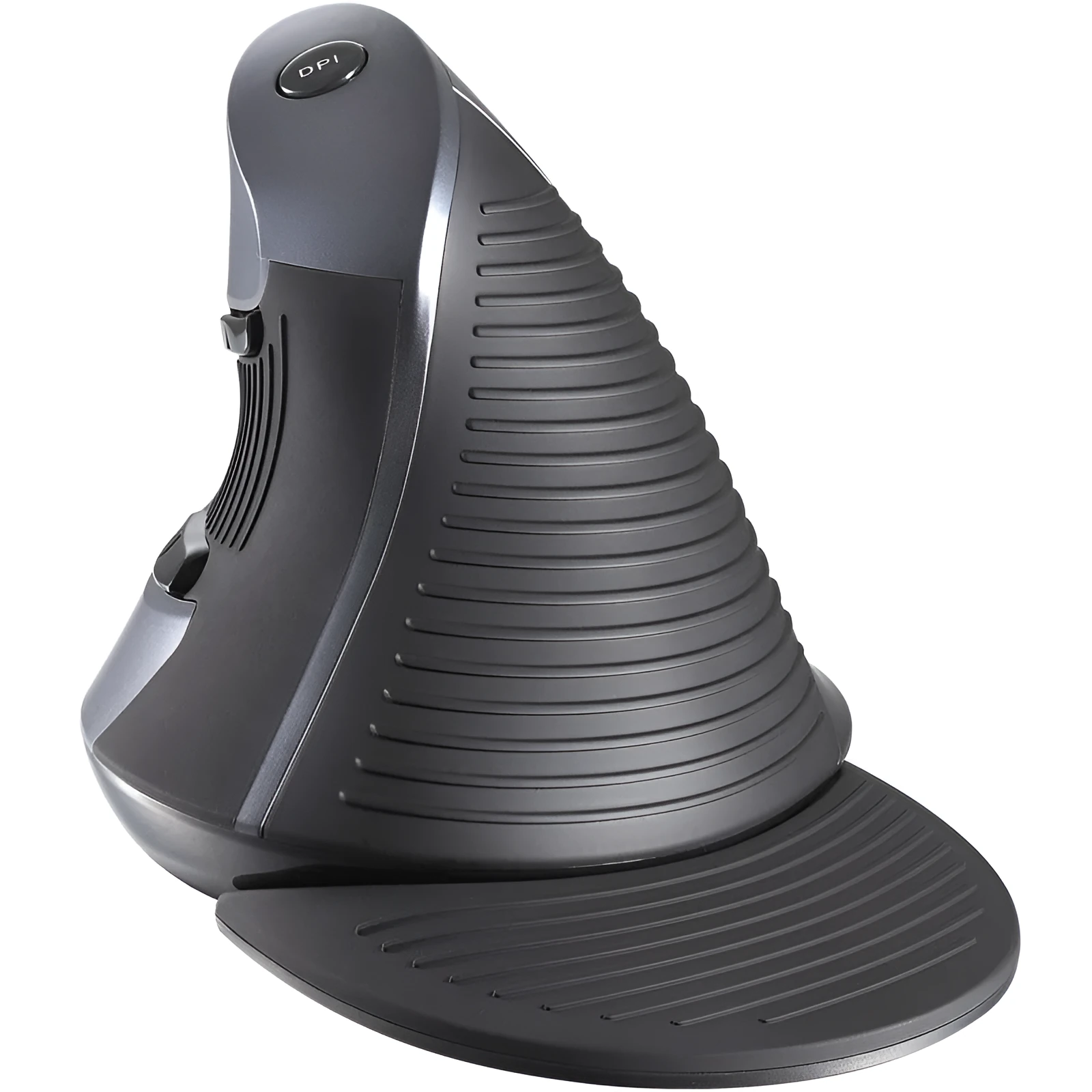 Brief section introduction with main benefits overview: Choosing the M618 vertical mouse brings several concrete advantages focused on comfort, practicality, and value. These benefits stem directly from its measurable specifications and design choices, offering a clear reason to consider it over a conventional mouse.


M618 Wireless Vertical Mouse: An Ergonomic PC Mouse with a 57° Vertical Angle to Reduce Wrist Strain During Extended Use
£39.98
Sale price
£39.98
Regular price
M618 Wireless Vertical Mouse: An Ergonomic Mouse with a 57° Angle to Support Your Wrist
Features and Build Quality of the Vertical Mouse
Ergonomic Design and Hand Posture
Design content: The core of the M618's design is its pronounced 57° vertical tilt. This angle is not arbitrary; it encourages your hand to rest in a neutral 'handshake' position, significantly reducing the forearm twist required by flat mice. The contours of the mouse body are shaped to support the palm and base of the thumb, promoting a relaxed grip. The overall footprint is compact, measuring 135.5mm in length, 100.0mm in width, and 87.0mm in height, which suits a variety of hand sizes without being overly bulky. This specific geometry is what differentiates it from standard office mice and is the primary feature aimed at improving user comfort over time.Technical Performance and Connectivity
Technical content: This mouse operates on a 2.4GHz wireless frequency, providing a stable connection typically up to a 10-metre range with the included USB nano receiver. It requires a working voltage of 5V, drawing a modest current of 50mA during active use, which drops to a standby current of 16mA when idle—factors that contribute to longer battery life. The standard configuration includes three primary buttons (left, right, middle), a clickable scroll wheel for precise navigation, and a dedicated DPI switch button. This switch allows you to cycle through preset sensitivity levels instantly, adapting the cursor speed for tasks ranging from detailed photo editing to scrolling through web pages without entering system settings.Material Quality and Surface Finish
Quality content: The main body shell is constructed from ABS plastic, a material chosen for its good impact resistance and ability to hold precise shapes from the moulding process. The surface undergoes an oil injection and silk screen finishing technique. This process gives the mouse a uniform, matte texture that feels smooth to the touch while providing enough grip to prevent slipping, even if your hands are dry. The silk screen printing is used for any logos or indicators, offering a durable mark that resists wear from constant contact. This combination results in a mouse that feels solid and well-made, capable of withstanding the rigours of daily office or home use.Practical Applications for the Ergonomic Mouse
Professional and Office Use
Professional content: For professionals such as data analysts, writers, accountants, and administrative staff who perform repetitive pointing and clicking tasks for 6-8 hours a day, the M618's design can be a practical intervention. The 57° angle helps mitigate the risk of developing or exacerbating conditions like repetitive strain injury (RSI) or carpal tunnel syndrome by promoting a healthier wrist position. The lightweight 115g build and responsive buttons reduce the physical effort required for each click and movement, which can help maintain productivity and focus throughout the workday without discomfort becoming a distraction.Everyday Home Computing
Consumer content: At home, whether you're managing finances, browsing the web, or editing personal photos, the M618 offers a more comfortable alternative to a standard mouse. The gentle contour of the ABS plastic body fits snugly in your palm, and the matte finish from the oil injection process provides a soft, secure touch that feels pleasant during extended sessions. The plug-and-play wireless functionality means no frustrating cable tangles on your desk, and the low power consumption helps the batteries last longer, so you're not constantly changing them. It's a straightforward upgrade that makes routine computing tasks feel less taxing on your body.Versatility for Different Users
Versatility content: While primarily an ergonomic tool, the M618's simple 3-button layout with a DPI switch makes it adaptable. Students can use it for writing essays and research, appreciating the reduced strain during marathon typing and editing sessions. The DPI switch allows for quick sensitivity changes, making it suitable for both precise design work in applications like Photoshop and faster navigation in strategy games, though it is not a dedicated gaming mouse. Its availability in classic black or clean white allows it to blend seamlessly with different desktop aesthetics, from a modern minimalist setup to a more traditional home office.Key Benefits of Choosing the M618 Mouse
Long-Term Value and Cost-Effectiveness
Value content: Investing in an ergonomic mouse is often about preventing future discomfort, which can be costly in terms of medical expenses, treatments, or lost productivity. The M618 provides a proactive, affordable solution. Its durable ABS construction and reliable 2.4GHz wireless connection are built for daily use over years, not months. Compared to the ongoing cost of physiotherapy or ergonomic assessments, the one-time purchase price of the mouse represents significant long-term value. Its efficient power usage also means fewer battery replacements, adding to its cost-effectiveness over time.User Experience and Confidence
Satisfaction content: Using the M618 can provide a tangible sense of confidence in your workspace setup. The peace of mind comes from knowing your wrist is supported in a neutral 57° position, a direct physical feature designed to combat strain. This allows you to concentrate on your work rather than adjusting your posture or shaking out a sore wrist. The consistent performance of the wireless connection and the tactile feedback from the buttons and scroll wheel create a reliable, predictable user experience that feels intentional and well-considered, not like a compromise for the sake of ergonomics.A Direct Reason to Make the Switch
Closing content: If you experience any form of wrist or forearm discomfort after using your computer, the M618 wireless vertical mouse offers a specific, measurable solution. Its 57° angled design directly targets the root cause of that discomfort by altering your hand posture. With its compact 135.5mm x 100.0mm size, light 115g weight, and simple plug-and-play setup, it integrates into your routine with minimal fuss. Make the switch to a mouse designed around the natural alignment of your arm and feel the difference in your daily computing life.